

5 VPNs for Philippines: Bypass Censorship & Get Philippines VPN Servers
 Tony Bennett
  2022.11.15
Over the past years, Internet freedom in the Philippines has been in decline.
Political discussions are not allowed in the Philippines. Other than that, the government is striving to increase Internet censorship in the country. Any sites deemed inappropriate by the government will be blocked. For example, people in the Philippines have to put up with the blockage of pornographic content.
The Philippines Cybercrime Prevention Act mandates Internet Service Providers (ISPs) in the country must retain user data for at least six months. That means ISPs in the Philippines track and collect people’s online traces. To stop ISP tracking, PandaVPN can help. Android new users have a 3-day free trial, while iOS new users have a free trial for 7 days.
PandaVPN offers the Philippines VPN server and features ECC encryption, OpenVPN protocol, and WireGuard protocol, which is a nice VPN for Philippines. In addition to this, more VPN options are described below. Keep reading to learn more.
Censorship in the Philippines
Check the table for a list of restricted categories and blocked content in the Philippines or read the text below the table for more details:
| Restricted Categories | Common Examples / Types |
| Adult Content | Restricted adult entertainment and streaming platforms |
| Peer-to-Peer / P2P | Certain file-sharing and P2P networks |
| News & Media Outlets | Selected local and independent news portals |
| Film & Media | Censored or restricted motion pictures |
Over recent years, regulatory bodies in the Philippines have implemented stricter nationwide blocks on various categories of content, including adult entertainment platforms, to comply with local internet safety regulations.
Additionally, authorities have occasionally restricted access to certain independent news portals and online media outlets amid ongoing regulatory and legal disputes regarding local media compliance.


Does the Philippines allow VPNs?
There are no official restrictions on VPNs in the Philippines. Whether fixed broadband or mobile, the government has not made user registration for the internet mandatory yet nor is there any ruling on VPN usage.
What Is the Best VPN for Philippines?
When it comes to selecting a VPN for Philippines, give priority to the following considerations:
- Privacy — The Philippines authorities monitor and control internet traffic, so it’s important to pick a Philippines VPN with a 0-log policy and jurisdiction outside of 5, 9 & 14 Eyes.
- Security — A VPN with strong encryption is better for the Philippines.
- Bypass Geo-Restrictions — A VPN with a large server network is necessary.
- Philippines VPN Server — A VPN with Philippines server helps you to connect to the local network.
- Cheaper Price — Price should be a particular concern for many Filipinos.
- Philippines VPN Free Trial — It is best to offer a free VPN trial so that you can try it risk-free.
- Refund Policy — Most VPNs have a refund policy in case you are not satisfied with the VPN service and request a refund.
Based on these considerations, we have found some VPNs for the Philippines that you can use.
Among All Philippines VPNs, PandaVPN Is Our Top Choice
PandaVPN is headquartered in Seychelles, an East African country where Internet privacy is protected by law, which is the VPN location of choice for many VPN vendors. What’s more, Seychelles is not part of the 5, 9, or 14 Eye Alliance countries, so you don’t have to worry about government agencies forcing VPN companies to hand over private user data.
As for security, PandaVPN features ECC encryption. On February 16, 2005, the NSA announced its decision to adopt the strategy of Elliptic Curve Cryptography (ECC) as part of the U.S. government standard for protecting sensitive information. This provides a glimpse of the security of ECC encryption.
PandaVPN supports OpenVPN and WireGuard protocol. OpenVPN is one of the best VPN protocols available today, offering the perfect balance of security, pairing and compatibility. WireGuard is a relatively new protocol that is faster and more encrypted than the current mainstream protocols OpenVPN and IPSec.
PandaVPN has a vast server network, offering 3000+ servers in 170+ locations in 80 countries worldwide. Such a large network of servers ensures its ability to unlock Geo-restrictions. More importantly, PandaVPN is a VPN with Philippines servers. Filipinos overseas can connect back to the Philippine network at any time.
With a minimum price of $2.49 per month, PandaVPN is one of the cheapest VPNs for the Philippines. All subscriptions come with a 7-day money-back guarantee.
Plus, it provides new Android users a 3-day free trial and new iOS subscribers a free trial for 7 days. iOS users need to pay for the subscription first. But you can cancel your subscription and get a refund within 7 days, and the trial will continue after the subscription is canceled.
More Philippines VPNs & a Comparison with PandaVPN
There are more Philiphines VPN options that come with PH VPN servers:
| PH VPN Server | Server Country | Lowest Price | Free Trial | Refund | |
| PandaVPN | 2 | 80 | $2.49/M | 3-7 Days | Y |
| ExpressVPN | 1 | 94 | $8.32/M | 7 Days | Y |
| AdGuard VPN | 1 | 44 | $2.40/M | N | Y |
| Surfshark | 1 | 65 | $2.49/M | 7 Days | Y |
| CyberGhost | 70 | 91 | $2.03/M | 24 Hours | Y |
Note:
1. PandaVPN’s free trial on new Android devices does not require a subscription, credit card, or other payment details. And you don’t have to offer an email address.
2. ExpressVPN’s free trial requires you to subscribe to a 12-month plan. An email address and a credit card are needed. Charges start after 7 days.
3. Surfshark’s free trial requires you to subscribe to a 12-month plan. Your card will not be charged for 7 days. However, if you forget to cancel the subscription, your card will be charged for 12 months.
4. CyberGhost has a 24-hour free trial that doesn’t require a credit card or other payment details. Your email address is required. However, CyberGhost has VPN servers in Shenzhen, China, which might be a RED FLAG for many people.
How to Connect to the Philippines VPN?
Here we take PandaVPN for Android as an example to show you how to connect to the Philippines VPN.
Step 1: Download and Install PandaVPN.
Download PandaVPN Philippines apk and get it installed on your device. Open PandaVPN and new Android users will get a free trial account for 3 days. All you need to do is set a password and log in to your account.
Step 2: Select a Server to Connect.
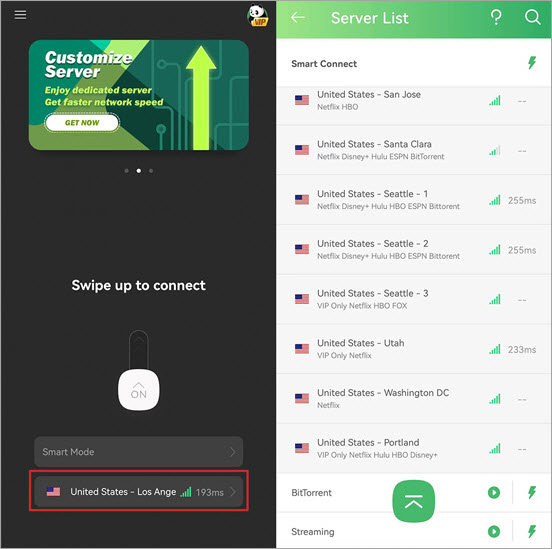
Enter PandaVPN server list and choose any server to connect to. You can find servers by categories such as United States, United Kingdom, etc., or directly search what you want from the search box.
Step 3: Open any Site that Is Blocked in the Philippines.
Now you can surf the internet without restrictions.
How to Get a Philippines VPN Server?
Now follow the steps to get a Philippines VPN server.
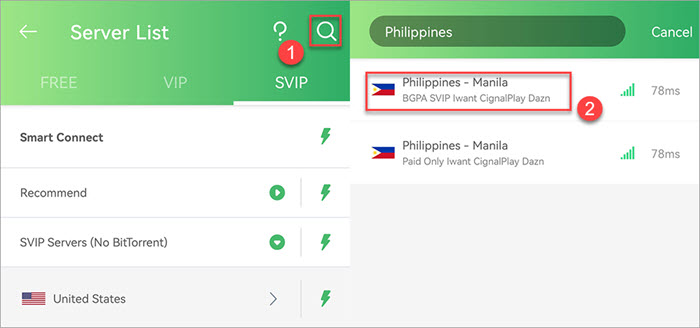
Step 1: Search for the VPN Server in the Philippines.
On PandaVPN’s server list page, tap the search icon, and type in Philippines to search for VPN servers in the Philippines.
Step 2: Change your IP Address to the Philippines.
Click and connect to a Philippines VPN server, and you’ll get a Philippines IP address. Then you can connect back your network to the Philippines.
FAQs about the Philipphines VPN
Q: Which VPN has a Philippines server?
VPNs we recommend above all come with servers in the Philippines. PandaVPN has 2 Philippines VPN servers and provides a 3-day free trial for new Android users without a subscription.
Q: Which VPN has the Philippines server free?
After testing a large number of free VPNs or VPN free versions, we found no providers offering free Philippines VPN servers.
Q: How to maintain privacy while handling file transfers or P2P traffic with a Philippines VPN?
A: When using the internet in the Philippines, protecting your personal data from ISP tracking and bandwidth throttling is crucial. While utilizing legal file-sharing services, a reliable VPN encrypts your traffic so your Internet Service Provider cannot monitor your activities. Follow the steps below to secure your connection:
-
Open PandaVPN and connect to any secure server location (e.g., US or local servers).
-
Access your authorized platforms and network services safely with full end-to-end encryption.
Q: How to watch sports streaming like UFC in the Philippines with a VPN?
A: PandaVPN supports major global sports broadcasting and streaming services. You can use PandaVPN to securely access authorized streaming platforms from anywhere.

A tech enthusiast who currently works for PandaVPN enjoys sharing VPN and tech industry information and is passionate about helping others solve their problems.
Related Posts


Featured Posts